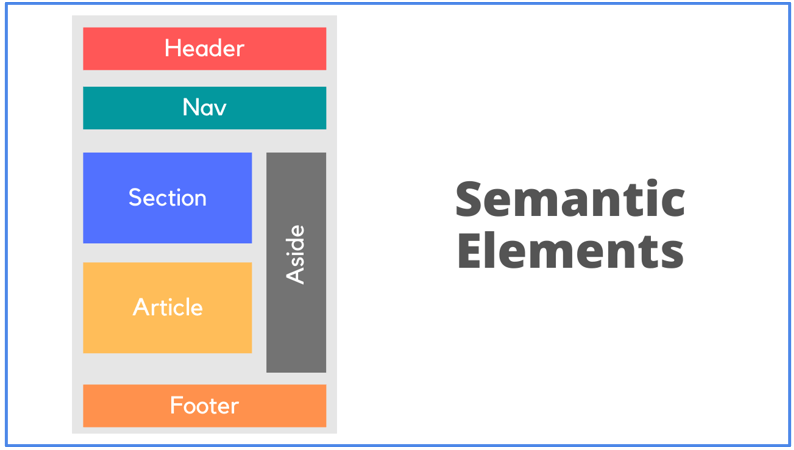
Semantic HTML is one of the most important foundations of modern web development. It improves the structure, readability and meaning of your webpages, helping both search engines and assistive technologies understand the content more effectively. Beginners often focus only on styling and JavaScript functionality, but the real strength of a professional website begins with clean, semantic markup. This guide explains what semantic HTML is, why it matters and how you can use it to improve accessibility, SEO and user experience.
Table of Contents
What Semantic HTML Really Means
Semantic HTML refers to using HTML elements that clearly describe their purpose. Instead of using generic tags for everything, semantic tags help define the role of each part of a webpage. Examples include header, footer, article, section, nav and main.
For example, a generic div does not tell search engines anything meaningful. But using article immediately communicates that the content is a self contained piece of information. Similarly, nav indicates that the enclosed links represent navigation for the page.
For detailed documentation, you can explore the MDN resource on semantic HTML
Why it Improves Accessibility
Millions of users rely on screen readers to browse the web. Screen readers use semantic tags to understand page structure and navigate content easily. If a page is built only with divs, assistive tools cannot interpret the hierarchy or relationships between sections.
- Semantic tags provide meaningful context.
- header tells the screen reader this is the top section of the page.
- nav indicates navigation menus.
- main identifies the core content of the page.
- article marks individual posts or content blocks.
- footer signals the end of the page or section.
This structured experience helps users navigate sections quickly without confusion. Proper semantics also improve keyboard accessibility, making your site more inclusive for users with disabilities.
How Semantic HTML Boosts SEO
Search engine optimization is not only about keywords and backlinks. Search engines like Google use semantic structure to interpret what your content means. Pages that follow semantic standards are easier to crawl, categorize and rank.
Search engines use header tags such as h1 and h2 to understand content hierarchy. Proper use of article helps Google distinguish separate blocks of content. Semantic sections improve rich results and featured snippet chances because search engines can extract relevant information more accurately.
Google’s own guidelines encourage using semantic HTML to improve structured understanding of webpages. Although semantic tags are not a ranking factor on their own, they directly help search engines interpret your content which improves visibility.
Better Maintainability and Clean Code
Semantic HTML makes your code easier to maintain. Developers understand the purpose of each section at a glance. Instead of reading long div structures, semantic tags tell the story visually.
- For example
- article within main tells you that this is an individual post.
- ul inside nav tells you this is a list of navigation links.
- aside signals additional or optional content such as related posts or ads.
This clarity reduces confusion, makes debugging faster and helps teams collaborate efficiently.
Common Semantic HTML Tags You Should Use
Here are some essential semantic elements every developer should use
- header for top banners, logos or intro content
- nav for site menus
- main for the primary page content
- section for grouping related content
- article for posts and standalone content pieces
- aside for secondary content
- footer for ending the page or section
Using these tags correctly gives your HTML meaningful structure.
Example: Turning Non Semantic Markup Into Semantic HTML
Here is a simple illustration.
Traditional beginners may write something like <div> <div>Site Menu</div> <div>Blog Content</div> <div>Sidebar</div> </div>
Semantic HTML transforms this into <nav>Site Menu</nav> <main>Blog Content</main> <aside>Sidebar</aside>
This new structure is easier for browsers, developers, search engines and assistive technologies to understand.
Semantic HTML and Modern Frameworks
Even when using React, Vue or Next.js, semantic HTML still matters. Frameworks render HTML in the browser, and search engines evaluate your markup just as they would evaluate a standard webpage. Using correct semantic elements improves SEO and accessibility in all environments.
Many modern design systems and component libraries encourage semantic structure. Developers should continue using semantic tags even when using component based architectures.
When To Use section vs article
Developers often confuse these two tags.
- Use article when the content can stand alone. Blog posts, news entries and tutorials are examples.
- Use section when grouping related topics inside a page but the content does not make sense independently.
Understanding this difference improves clarity and SEO friendliness.
Conclusion
Semantic HTML is not an optional skill. It is a core practice for creating accessible, search friendly and professional websites. It strengthens your markup, improves usability and makes your pages more understandable for both humans and machines. Whether you are building a personal blog or a large application, mastering semantic HTML will elevate your work and set a strong foundation for long term growth.
Also Check Introduction to HTML – Powerful Guide – 2025.


1 thought on “Semantic HTML – Powerful Impact on SEO – 2025”